February 17, 2026·Product
Announcing Collaboration on Stores in Bloom
Riqwan Thamir

Riqwan Thamir
Invite your team and work collaboratively on your Bloom stores.
Collaboration is available today for all Bloom organizations
Bloom helps you build stores using natural language. You describe what you want, and Bloom turns it into a working webshop. But building a store is rarely a solo effort.
Today, we are introducing collaboration in Bloom. Invite your team, work in shared sessions, and follow agent runs as they happen.
How it works
Team invites
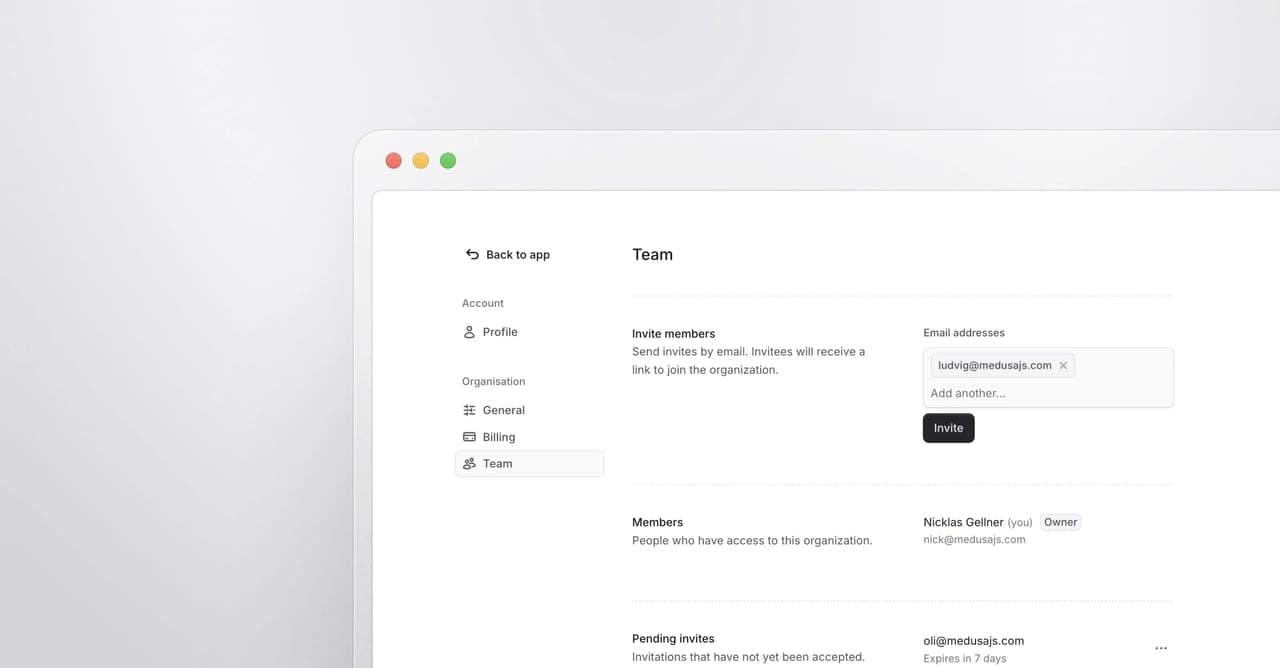
Invite team members to your Bloom organization directly from the Account Settings. Enter one or more email addresses, and Bloom sends each person an invite link.
From the Team page in Account Settings, you can manage pending invites, resend them, or revoke them. Once someone accepts, they join your organization and immediately get access to your sessions.
Shared sessions with real-time activity
All sessions in Bloom are shared across your organization. Every member can open, review, and continue any session. A teammate can pick up where you left off or continue iterating on a session you started.
When a team member starts an agent run, everyone else in that session sees it happen live. Bloom shows who is working on the session, and the agent's output streams in real-time.
No refresh. No re-opening. Just stay in the session and watch the work unfold.
Inviting a user
Working together in real-time
What's next
This is the foundation for collaboration in Bloom. We plan to build on this in the near future with feature branches so teams run multiple AI sessions, parallelize work and explore ideas side by side.
We will continue to make Bloom a better place for teams to build stores together.