December 29, 2025·Product
Bloom Feature: Code view & Push to Github
Carla Böddeker

Carla Böddeker
Code View gives you access to the code behind your Bloom project, helping you understand the structure, make precise edits when you need them and now push your project directly to Github.
In November, we introduced Bloom: an AI-powered assistant with deep commerce expertise that helps you build and manage custom commerce setups using natural language.
Developers have always been at the core of Medusa. With this in mind, we are opening up Bloom and bringing it closer to your GitHub workflows. You can now view and edit Bloom’s code directly through Code View and push changes to your own GitHub repository for further development.
Below, we walk through the new Bloom features.
Introducing Bloom
Learn about the idea and vision behind Bloom in our Announcement post.
Code View: Behind the scenes of what Bloom builds
When building with Bloom, you already get a live preview of your project as it comes together. But sometimes you want to understand how everything is structured under the hood: the files Bloom generates, how components are organized, or where certain logic lives.
That’s what Code View is for.
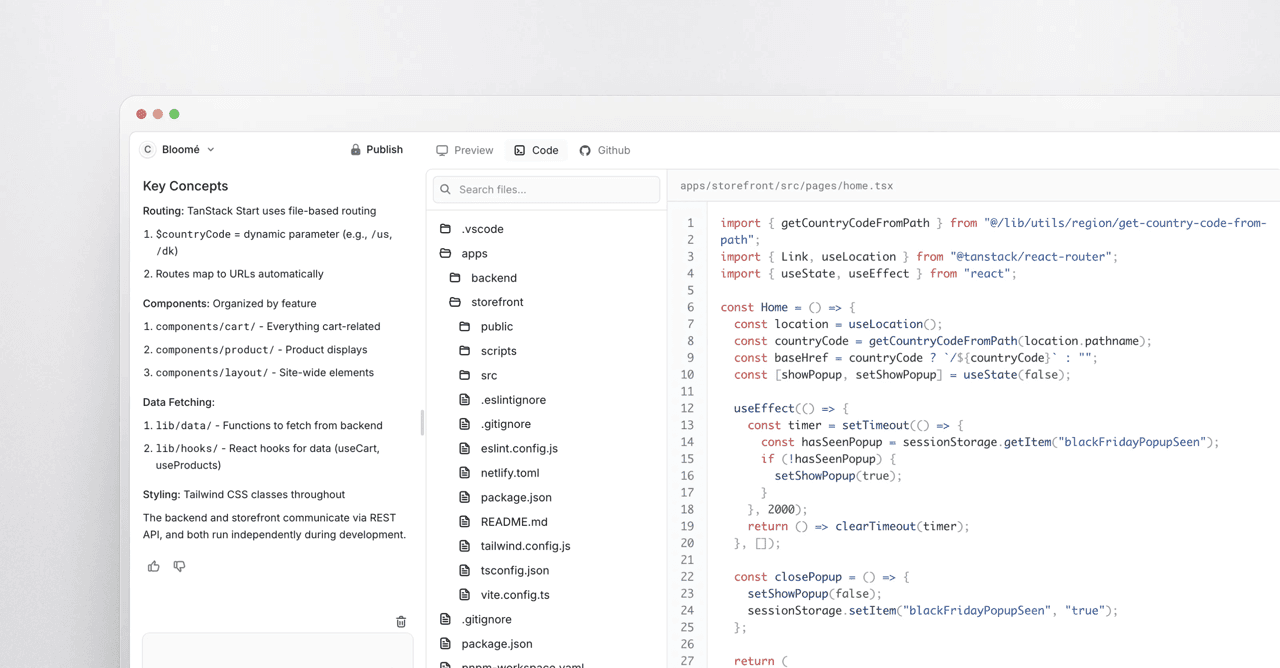
With a single click, you can switch from the visual preview into the full codebase Bloom is generating in real time. You can click through folders, open files, and see exactly how the project is assembled, then switch back to the preview just as easily.
Code View also lets you interact with Bloom directly, asking the agent to explain the file structure, point out where components live, or guide you to the right place for making a specific change. It’s an easy way to orient yourself in the project, even if you’re not the one writing most of the code.
For example, you can prompt Bloom to help you:
- Understand structure: “How is this project organized?”
- Locate components: “Where is the navbar defined?”
- Find styles: “Which file controls the hero section?”
- Get edit pointers: “Where can I change this background color?”
Make real-time edits directly in the code
Code View is not only about understanding the project, it also gives you the option to make precise changes directly in the code whenever you want more control. While Bloom can handle most updates through natural language, there are moments where you know exactly what you want: a specific spacing value, a new image URL, a custom color, or a different font size.
In Code View, you can make these edits yourself and see the results instantly in the preview. For example, adjusting the size of a navbar or updating the styling of a section becomes as simple as tweaking a line of code.
This level of control is helpful when you want to fine-tune the details or apply brand-specific styling that would normally require a developer's expertise.
Bloom gets you where you want to be fast, and Code View unlocks the final levels of precision and control.
Push your Bloom project to GitHub
Another new feature allows you to push your Bloom-generated project directly to GitHub.
This makes it easy to collaborate with your team, track changes, and keep building using the tools and workflows you already know. Starting from natural language in Bloom, pushing to GitHub helps you move quickly from experimentation to a live project.
Get access to Bloom
Try Bloom’s newest features before public release.