December 16, 2025·Product
Introducing experimental support for Translations
Adrien de Peretti

Nicolas Gorga

Adrien de Peretti & Nicolas Gorga
Manage product information, such as titles, descriptions, categories, and more, in multiple languages with Translations.
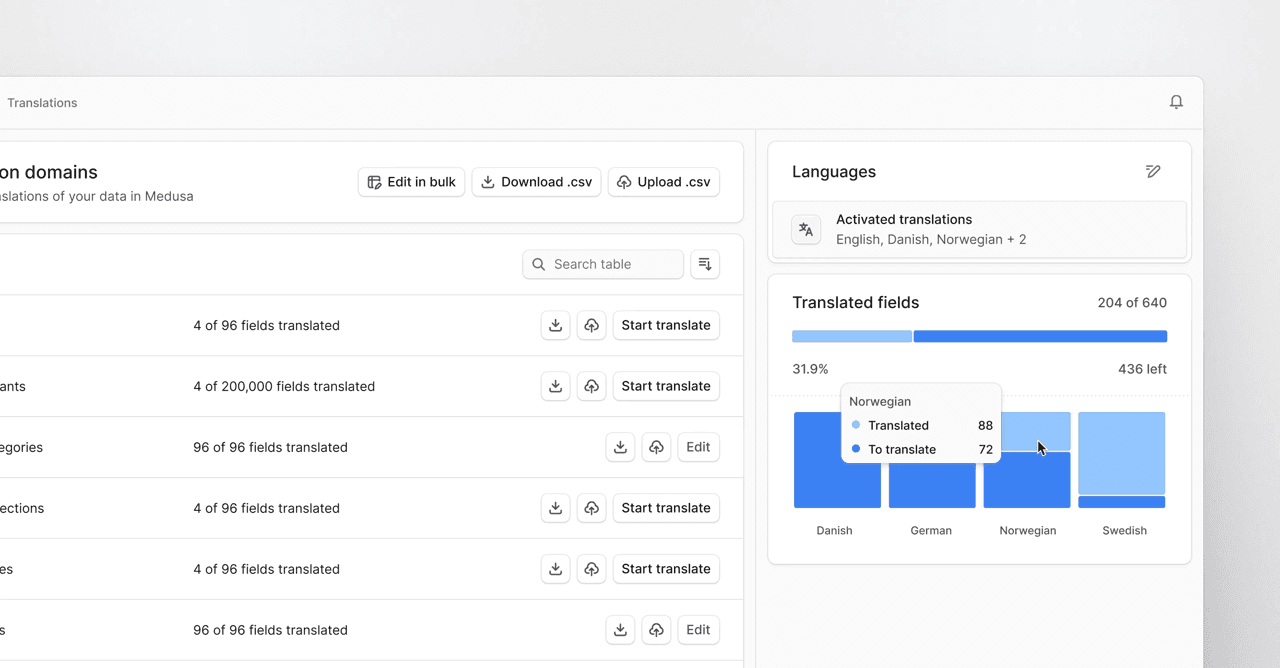
Medusa was built to enable global commerce from day one with features such as multi-region and multi-currency support. Today, we are excited to extend those capabilities with the introduction of Translations in our open-source core.
With Translations, merchants can manage Product information like titles, descriptions, categories and more, in multiple languages. This initial release focuses on entities in the Product Module, as these are the most commonly translated ones. The official release in January will expand translation support to additional core entities and introduce framework-level tooling for translating custom entities.
Translations is released as an experimental feature and is gated behind a feature flag.
Installing Translations
To use Translations, enable the feature flag and add the Translation Module in Copy to clipboardmedusa-config.ts:
123456789101112131415import { defineConfig, loadEnv } from "@medusajs/framework/utils";loadEnv(process.env.NODE_ENV || "development", process.cwd());module.exports = defineConfig({...modules: [{resolve: "@medusajs/translation",},],featureFlags: {translation: true,},});
Then, apply the database migrations by running the following command:
1npx medusa db:migrate
Your application is now ready to use Translations.
Setting up Translations
To manage translations, you must set up your store's locales in the store settings:
Once configured you can manage translations by going to the Translations setting in the admin dashboard. Translations are managed in a spreadsheet-like experience for efficient navigation:
The currently translatable entities are pre-defined by Medusa. In the official release, the translation settings will include custom translatable entities.
Translations for individual entities are also easily manageable from within their details pages:
Using Translations in the storefront
Once your entities are translated, they can be queried from the API by specifying a locale as either a query parameter or using the Copy to clipboardx-medusa-locale header. At request-time, Medusa resolves the translated fields for your entities and returns the localized strings instead of the original ones. If a translation is missing for a given field or entity, Medusa will fall back to the original string defined on the entity. This ensures that the API returns complete data, avoiding custom fallback logic in the storefront.
Having to specify a locale on all API requests is a frustrating developer experience. We recommend integrating a solution to automatically attach locales across API requests. The solution will look different depending on the environment.
Locales in client environments
In client environments, such as browser-based storefronts, the locale can be managed entirely on the client. Our JS SDK provides built-in support for persisting and applying locales, removing the need to manually specify the locale on every request.
The JS SDK exposes APIs to manage the locale, allowing your customers to select the language they want to shop in:
1sdk.setLocale("fr-FR")
The selected locale is persisted across browser sessions and page refreshes, ensuring that customers always see a localized version of your store that respects their most recently selected locale.
Locales in server environments
The JS-SDK uses the browser's local storage to persist locales across customer sessions. Since local storage is not available in server environments, such as server components or server actions from frameworks like Next.js, the JS-SDK cannot manage locales in these contexts.
A common alternative in server environments is to use request cookies. For example, in a Next.js application, you can maintain a cookie across requests, serving the same purpose as the locale from the JS-SDK.
The cookie would be set or refreshed whenever the storefront language changes:
12345678import { cookies } from "next/headers"export const setLocale = async (locale: string) => {const cookies_ = await cookies()cookies_.set("_medusa_locale", locale, {maxAge: 60 * 60 * 24 * 7,})}
You can then have a small utility to construct the locale cookie for other API requests:
123456789101112import { cookies } from "next/headers"export const getLocaleHeader = async () => {try {const cookies_ = await nextCookies()const locale = cookies_.get("_medusa_locale")?.valuereturn { "x-medusa-locale": locale }} catch {return {}}}
Finally, attach the locale header to requests made from the server:
1234567export async function listProducts(queryParams) {const headers = {...(await getLocaleHeader()),}return sdk.store.product.list(queryParams, headers)}
You can read more about using translations in the storefront in our documentation.
Checkout
Carts and orders are integrated with translations and have line items in the customer's locale. When the locale on the cart or order is updated, Medusa automatically resolves translations for the new locale and updates line items where possible.
To maintain consistency during shopping and checkout, we recommend updating the cart locale whenever the storefront locale changes. For example, in your storefront, locale switching can be handled by a function that updates both the locale of the JS-SDK and the active cart locale:
12345async onLanguageUpdate(locale) {sdk.setLocale(locale) // -> in client environments// setLocaleCookie(locale) -> in server environmentsawait updateCart({ locale }) // update the cart for consistency}
Conclusion
The first experimental release of Translations only includes entities from the Product Module. We will apply the same pattern to other core modules in future releases and offer tooling to easily translate entities from your custom modules.
Bear in mind, the feature is still experimental, so we cannot guarantee a complete friction-less experience. Please report bugs and unexpected behavior on GitHub and we will attend to them as soon as possible.