January 7, 2026·Product
Introducing: Log in with Medusa Cloud
Oliver Juhl

Pedro Guzmán

Oliver Juhl & Pedro Guzmán
Medusa Cloud now enables direct admin dashboard authentication with Log in with Medusa Cloud.
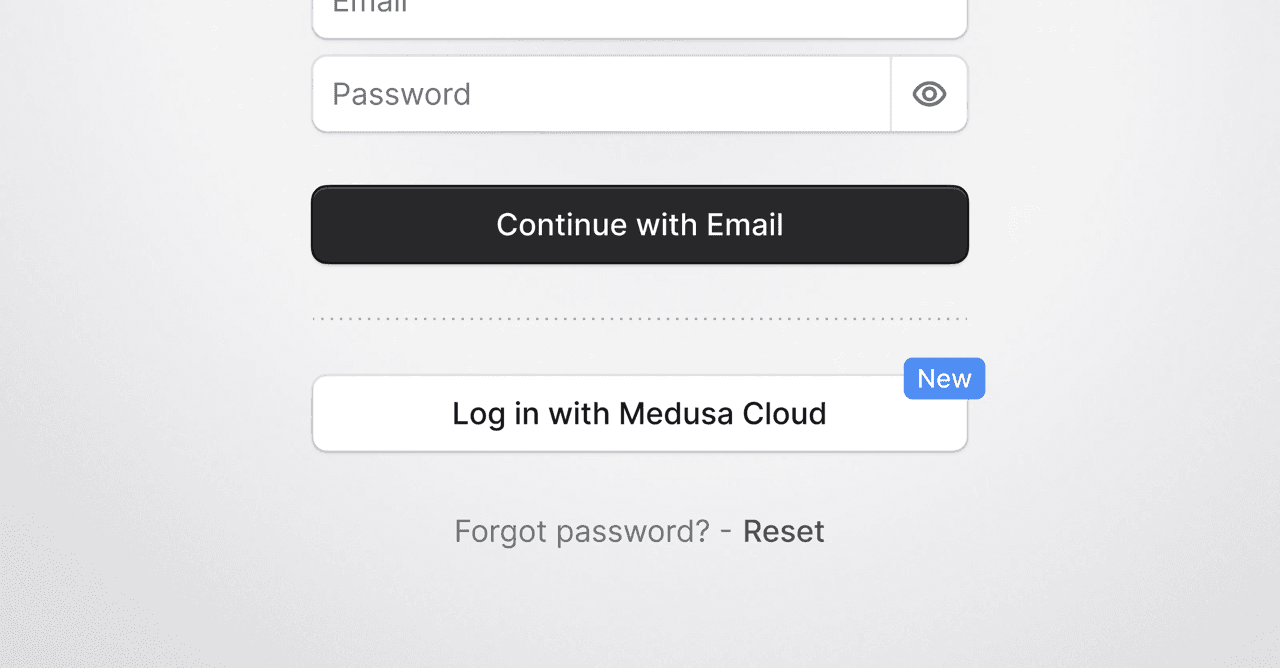
We are excited to introduce Log in with Medusa Cloud to simplify Medusa Admin access for projects deploying on Medusa Cloud. Historically, every environment in a project required separate credentials for the admin dashboard, which created unnecessary friction in operational and development workflows. With Log in with Medusa Cloud, any user in a Medusa Cloud organization can sign in to admin dashboards of environments within their project using their Cloud identity.
How it works
All projects that deploy on Medusa Cloud have access to Log in with Medusa Cloud, provided they use version 2.12.4 or higher.
When the feature is enabled, the admin dashboard login screen displays a Log in with Medusa Cloud button. Clicking it prompts the user to authenticate with their Cloud credentials. Upon successful authentication, the user is signed directly into the admin dashboard.
Behind the scenes, Medusa Cloud verifies that the user belongs to the organization that owns the project and environment. Once validated, access is granted and a corresponding admin user is created in the dashboard with a Cloud provider identity.
Getting started
To use this feature, users must be members of the Medusa Cloud organization that owns the project. You can invite users from the organization settings page in the Cloud dashboard.
Additionally, the feature must be enabled at the project level. New Medusa Cloud projects have it enabled by default. For projects deployed before this release, it must be enabled manually. Refer to the documentation for setup instructions.
Existing login methods remain supported. If you choose not to use Log in with Medusa Cloud, it can be disabled via the same configuration.
Try it today
Log in with Medusa Cloud is now available for all Medusa Cloud projects. Head over to your Cloud dashboard to enable it and start simplifying how your team accesses admin dashboards across your environments.