January 20, 2026·Product
Build an AI Commerce Insights Dashboard with Medusa and json-render
Shahed Nasser

Shahed Nasser
Learn how to integrate AI into Medusa Admin using json-render to generate dynamic dashboards and commerce reports from prompts, including abandoned cart, inventory, and sales insights.

Medusa is a digital commerce framework that empowers AI ecommerce and agentic commerce development workflows. Medusa's flexible framework supports developers in building powerful commerce experiences that integrate with the latest technological tools and trends, including LLMs, AI agents, and commerce automation.
json-render is a library that generates UI from user prompts with AI. By integrating json-render with Medusa, you can create dashboards, forms, and reports on the fly that suit the user's needs, making Medusa an ideal AI-ready ecommerce framework for building dynamic admin experiences.
For example, you can allow admin users to query dynamic commerce insights like abandoned carts, product inventory, or sales analytics, then generate the report on the fly using an AI agent.
This guide will cover the general steps to build an AI-powered commerce insights page with json-render and Medusa.
How it Works
To build an AI commerce reports dashboard with json-render and Medusa, you need:
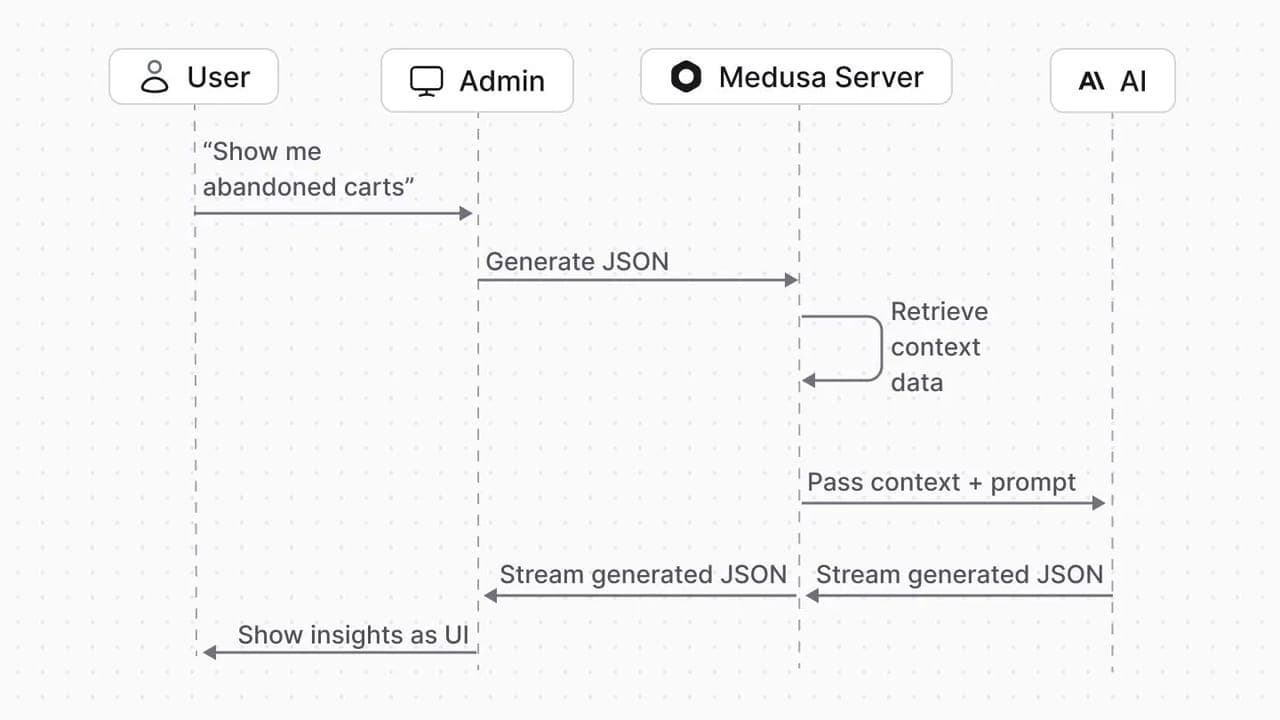
- An API route that returns a JSON stream of the UI to show in the dashboard. To do that, the API route will:
- Generate a context prompt that includes the commerce data necessary, like abandoned carts, and the catalog of UI elements.
- Pass the context and user prompts to the underlying LLM to generate the JSON.
- Return the JSON as a stream.
- A UI route that adds a new page to the Medusa Admin dashboard. It will fetch the JSON from the API route and render the JSON as UI using json-render.
Admin users can then enter prompts from the dashboard, which will generate the JSON and render the UI, creating an AI analytics dashboard inside Medusa.
Prerequisites: Commerce Framework with Medusa
To follow this guide, you need a Medusa application installed locally. If you don't have one, create a Medusa application with the following command:
1npx create-medusa-app@latest
Refer to the Installation guide for more details on prerequisites and troubleshooting.
Install Dependencies
Next, you need to install the dependencies necessary for the implementation. Run the following command in your Medusa application:
1yarn install ai @ai-sdk/anthropic @json-render/core @json-render/react zod
Where:
- Copy to clipboard
aiand Copy to clipboardai-sdk/anthropic: AI toolkit and SDK provider to generate the UI as JSON. You can replace Copy to clipboardai-sdk/anthropicwith the provider of the LLM you want to use. - Copy to clipboard
@json-render/coreand Copy to clipboard@json-render/react: The json-render dependences. - Copy to clipboard
zod: Zod library to create validation schemas. json-render requires it to create the UI catalog, as you'll see later.
Retrieve Data From Medusa
You'll first create the pieces needed for the AI insights API route.
The API route will retrieve data from Medusa relevant to the user's query. You can retrieve this data dynamically, or define specific functions to retrieve specific data.
For example, if the user's query mentions abandoned carts, you can retrieve the necessary data in Medusa:
1234567891011121314151617181920// src/lib/ai/data-context.tsasync function fetchAbandonedCarts(query: Query, days: number = 7) {const startDate = new Date()startDate.setDate(startDate.getDate() - days)try {const { data } = await query.graph({entity: "cart",fields: ["id","email","created_at","updated_at","completed_at","items.id","items.title","items.quantity","items.unit_price","customer.id",
Define UI Catalog
You also need to define the UI catalog that json-render will translate into a context prompt. This context prompt will allow AI agents to generate a JSON describing the UI to render.
To ensure the design remains consistent with Medusa's dashboard, you can use the Medusa UI library. It provides components for containers, statuses, buttons, and more.
1234567891011121314151617181920// src/lib/ai/ai-catalog.tsimport { createCatalog } from "@json-render/core"import { z } from "zod"const ContainerSchema = z.object({className: z.string().optional().describe("CSS classes for styling"),})const StatusBadgeSchema = z.object({label: z.string().describe("Badge text"),variant: z.enum(["default", "success", "warning", "danger", "info"]).default("default"),})// other component schemas...export const catalog = createCatalog({name: "Medusa",components: {Container: { props: ContainerSchema, hasChildren: true },
AI Insights API Route
You can now create a custom API route that accepts a user's prompt and sends it to the LLM with the catalog and data as context. It streams the JSON of the generated UI in the response.
1234567891011121314151617181920// src/api/admin/ai-insightsimport { streamText } from "ai"import { createAnthropic } from "@ai-sdk/anthropic"import { generateCatalogPrompt } from "@json-render/core"export async function POST(req: MedusaRequest<AiInsightsSchemaType>,res: MedusaResponse): Promise<void> {const { prompt, currentTree } = req.validatedBody// Resolve Queryconst query = req.scope.resolve("query")// Build data context based on prompt keywordsconst dataContext = await buildDataContext(query, prompt)// Generate catalog promptconst catalogPrompt = generateCatalogPrompt(catalog)
In the API route, you:
- Resolve Query from the Medusa container. It allows you to retrieve data across modules.
- Retrieve the data that will be used in the generated UI. For example, if the user asks for abandoned cart insights, the data will be the abandoned carts.
- Generate the prompt explaining the UI catalog, allowing the LLM to understand what UI components it can include in the generated JSON.
- Initialize the Anthropic client, passing your Anthropic API key.
- Stream the response from the LLM. You pass it the catalog and context prompts with the user's prompt.
Admin Components Registry
Before creating the page that displays the AI-generated UI, you need to define the React components that the generated JSON is translated into. These are the same components you defined Zod schemas for in the catalog earlier.
123456789// src/admin/lib/component-registry.tsximport { ComponentRegistry } from "@json-render/react"import { Container, StatusBadge } from "@medusajs/ui"export const componentRegistry: ComponentRegistry = {Container,StatusBadge,// other components...}
Admin UI Route
Finally, you can define the UI route that will show the new AI insights page in the admin dashboard.
1234567891011121314151617181920// src/admin/routes/ai-insights/page.tsximport {useUIStream,Renderer,DataProvider,ActionProvider,VisibilityProvider} from "@json-render/react"const AIInsightsPage = () => {const [prompt, setPrompt] = useState("")// Use useUIStream hook for proper tree handlingconst { tree, isStreaming, error, send } = useUIStream({api: "/admin/ai-insights",})const handleSubmit = () => {if (prompt.trim() && !isStreaming) {send(prompt)
In the UI route, you:
- Render an input that allows the user to enter the prompt. For example, "Show me abandoned cart insights".
- When the user submits the prompt, send a request to the Copy to clipboard
/admin/ai-insightsroute. - The route will return the generated response as a stream. json-render's Copy to clipboard
useUIStreamwill handle parsing that stream into a UI tree that you render with their Copy to clipboardRenderercomponent.
Test Implementation
To test out the implementation, start the Medusa application:
1yarn dev
Then:
- Go to Copy to clipboard
localhost:9000/appand log in. - Click on AI Insights in the sidebar.
- In the input shown, enter a prompt like "Show me abandoned cart insights" and submit the form.
- The UI will be gradually shown with abandoned cart insights. Based on the components you add to the catalog, the UI can show tables, charts, number insights, and more.
Start Building with Medusa
If you're new to Medusa, check out the documentation, where you'll get a more in-depth understanding of what Medusa is, the commerce features it provides, and how to deploy Medusa to Cloud.