January 14, 2026·Product
Integrate PayPal with Medusa
Shahed Nasser

Shahed Nasser
Learn how to integrate PayPal as a payment provider in Medusa, and accept payment with PayPal during checkout.
Community Requested Tutorial
This tutorial was requested by our community.
Payment is a core commerce component that every online business needs. By offering a variety of payment options during checkout, you make the process smoother and more convenient for customers.
Medusa is a digital commerce platform with a built-in framework for customization. Its modular architecture makes it easy to integrate third-party services that handle commerce actions such as payment processing. Developers can integrate their preferred payment processor, such as PayPal, and Medusa automatically orchestrates the payment workflow as part of its core checkout flow.
Integrate PayPal with Medusa
Follow this step-by-step guide
Integrate PayPal as a Payment Provider
Medusa's Payment Module provides the interface for processing payments and delegates the actual payment handling to the underlying providers that developers integrate.
To integrate PayPal with Medusa, you create a Payment Module Provider whose service interacts with PayPal's APIs. The service implements the methods Medusa expects, such as initializing, authorizing, and capturing payments.
1234567891011121314151617181920class PayPalPaymentProviderService extends AbstractPaymentProvider {constructor(container, options) {// Initialize PayPal clientthis.client_ = new Client({environment:this.options_.environment === "production"? Environment.Production: Environment.Sandbox,clientCredentialsAuthCredentials: {oAuthClientId: this.options_.client_id,oAuthClientSecret: this.options_.client_secret,},})}async initiatePayment(input) {// create PayPal order...}async authorizePayment(input) {
Use PayPal During Checkout
Once you integrate and configure the PayPal provider, customers can use it during checkout.
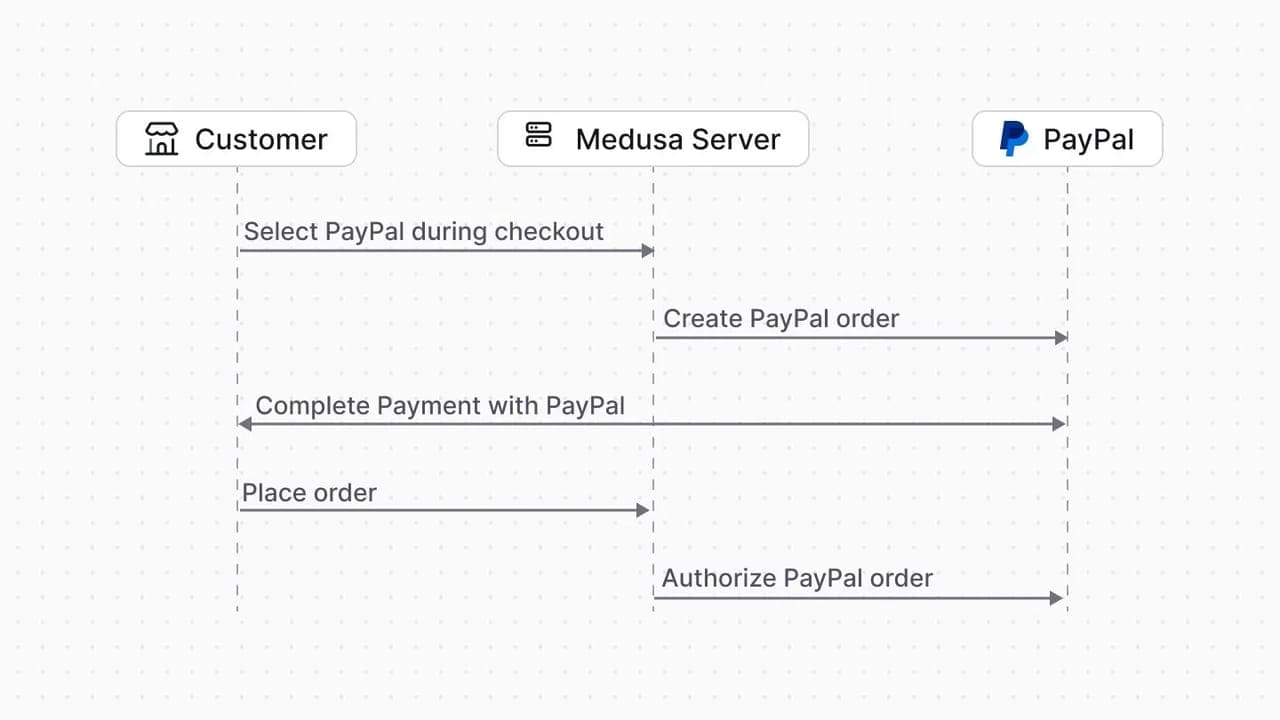
Medusa automatically uses your PayPal provider’s service to perform the required payment actions. When the customer selects PayPal during checkout, Medusa creates an order in PayPal. When the customer places the order in Medusa, Medusa authorizes the payment for the PayPal order.
Handle PayPal Webhook Events
Medusa provides built-in support for handling webhook events from payment providers. You define the logic for processing these events in the PayPal provider, then configure the webhook in PayPal.
Once configured, PayPal will send webhook events, such as payment authorization or capture, which are especially useful if payments are completed directly through PayPal or if a connection error occurs during checkout. Your provider handles these events to inform Medusa of the actions needed to keep payment status in sync.
1234567891011121314151617181920class PayPalPaymentProviderService extends AbstractPaymentProvider {async getWebhookActionAndData({data, rawData, headers}) {await this.verifyWebhookSignature(headers,data,rawData)const eventType = data.event_typeswitch (eventType) {case "PAYMENT.AUTHORIZATION.CREATED":return {action: PaymentActions.AUTHORIZED,data: {session_id: data.resource.custom_id,amount: data.resource.amount.value},}
Tutorial: Integrate PayPal with Medusa
In our documentation tutorial, you’ll learn how to:
- Integrate PayPal as a payment provider in Medusa.
- Enable the PayPal provider in your store’s regions.
- Customize the Next.js Starter Storefront to accept PayPal payments.